Stop Overpaying for Design Assets — Envato Elements Changes Everything
I used to do this thing where I would open a blank project, get excited for about 11 minutes, then immediately hit the wall.
Not a creative wall, not really. More like a “I need a decent font, a clean icon set, a few photos that do not look like stock photos from 2012, and maybe a template so I’m not reinventing the wheel” kind of wall.
And then the tab explosion starts.
- Google fonts. Then another font site.
- A marketplace for icons. Add to cart.
- A stock photo site. Another subscription.
- A video template site. Different pricing.
- Oh and I need a mockup. That’s another place, another license, another checkout.
At some point you realize you are not designing anymore. You are shopping. You are licensing. You are doing mental math.
That’s the part nobody warns you about.
This is why I’m writing this. Because I honestly think most people are overpaying for design assets, and they do not even realize it. Envato Elements is one of those rare services that actually changes the workflow, not just the price tag.
The real reason you keep overspending (it’s not just the asset price)
A single asset being “only $12” is not the problem.
The problem is that design work is never one asset.
It’s a stack.
You start with a logo concept. Now you need a presentation deck to pitch it. Then you need a brand guideline doc. Then social templates. Then maybe a simple website or landing page. Then a promo video. Then 10 thumbnails. Then a couple mockups to make it look real.
And every step adds another micro purchase.
You also end up compromising. You pick the cheaper icon pack even if it does not match the style. You reuse the same two fonts because buying more feels annoying. You settle for a photo that is “fine” because the better one costs extra.
It’s not just money. It’s friction.
If you’re a freelancer, this eats margin. If you’re on a team, this slows everything down. If you’re a solo creator, it just drains your energy.
I’m not exaggerating when I say the biggest hidden cost is the constant stopping and starting.
Envato Elements in plain English
Envato Elements is a subscription library of creative assets.
You pay one flat fee and you can download unlimited items from their catalog, as long as your subscription is active. That includes stuff like:
- Stock photos
- Video templates
- Motion graphics
- Music and sound effects
- Graphics, illustrations, icons
- Presentation templates
- Fonts
- WordPress themes and plugins (yes, that too)
- Mockups
- Social media templates
- UI kits, add ons, all the little bits you always need at the last minute
So instead of buying one item at a time, you basically get a giant toolbox.
And the part that matters. Licensing is built for real work. You download an item, you register it to a project, and you use it. Simple.
“Unlimited downloads” sounds like marketing fluff, but it’s not
When I first heard unlimited downloads, I assumed there would be some catch that makes it useless.
Like maybe the good stuff is locked. Or everything is generic. Or you can download but cannot really use it commercially. That kind of thing.
But the unlimited part is actually what changes your creative process.
Because now you can explore.
You can try 12 different hero images and pick the one that actually fits. You can test three typography directions without worrying you are wasting money. You can grab five mockups, compare them, and choose the best presentation. You can download a few different After Effects logo reveals and see which one feels right.
This is how designers work when they’re not being punished for experimenting.
The weird thing is, experimentation is usually what leads to the best final result. Yet most people avoid it because every “maybe” costs money.
Envato Elements removes that tax.
Why it’s a big deal for non designers too
This isn’t only for full time designers.
If you are:
- a YouTuber who needs thumbnails, lower thirds, music beds
- a marketer building landing pages, ads, lead magnets
- a startup founder making pitch decks and UI mockups
- an educator creating slides, worksheets, course visuals
- a blogger trying to make posts look less… plain
- a small business owner making menus, flyers, social posts
You are basically doing design work all the time. Even if you do not call it design.
And those people usually get hit the hardest by the piecemeal model because they do not have a “system” for assets. They just buy whatever they need that day.
Envato Elements gives you a system.
You need a clean Instagram carousel template. Download a few. Pick one. Done.
You need a font pair that feels premium. Download, test, move on.
You need product mockups for a Shopify store. Grab them, swap the smart objects, you’re shipping visuals in an hour.
That speed is the real value.
The catalog is broad in a way that matters
A lot of asset libraries are deep in one category and weak everywhere else.
Envato Elements is broad. And that sounds like a small thing until you are mid project and you realize you need one random piece to finish the job.
For example, you are designing a brand kit. You find a logo template or icon style you like. Great.
Then you need:
- matching social templates
- a brand guidelines doc template
- a presentation template for the pitch
- mockups for the logo on a business card and storefront sign
- maybe even a simple WordPress theme for the site
Being able to keep the vibe consistent using assets from the same ecosystem is huge. It saves time and it makes the end result look like a real brand, not a collage of random pieces.
Also, the templates are not just Canva style templates. There are options for Adobe apps too, like Photoshop, Illustrator, InDesign, Premiere Pro, After Effects. So you can work in whatever tool you already use.
The licensing part, without the legal headache
Licensing is where most people get nervous, and honestly they should. It’s easy to accidentally use something in a way you shouldn’t, especially if you are pulling assets from random sites.
Envato Elements uses a straightforward commercial license model.
Here’s the practical version.
- You can use items in commercial projects.
- You register each download to a specific project.
- If you cancel your subscription later, you can keep using the items in projects that were registered during your active subscription.
So you are not stuck in some weird situation where your client’s website suddenly becomes “unlicensed” because you stopped paying.
That matters for client work and long term content.
Now, I’m not a lawyer, and you should always read the actual license terms for edge cases. But compared to juggling five different marketplaces with five different licenses, this feels like breathing again.
The money math that finally makes sense
Let’s do the real world math, not the brochure math.
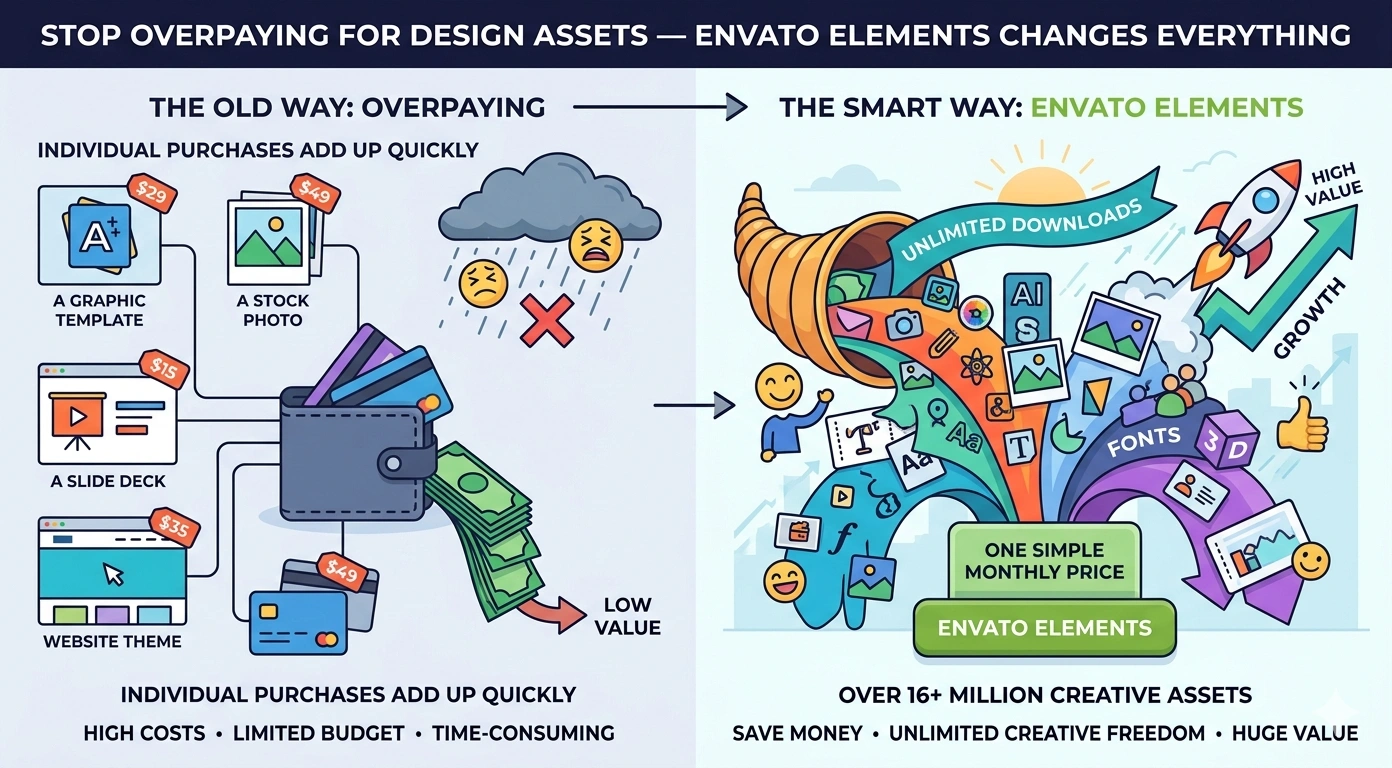
If you buy assets one by one, you might pay:
- $10 to $30 for a font (sometimes more)
- $5 to $30 for an icon set
- $15 to $80 for a PowerPoint template
- $10 to $50 for a mockup pack
- $20 to $100 for a video template
- plus stock photos, music, whatever else
It adds up fast. And not even in a dramatic way. It’s more like death by a thousand receipts.
With Envato Elements, the subscription can replace a big chunk of those purchases. Especially if you create content weekly, run campaigns, or do client projects.
Even if you only save yourself from two or three separate purchases a month, you are usually ahead. And again, the time saved is part of the ROI. You are not hunting. You are not comparing licenses. You are just building.
The underrated benefit: your work looks more consistent
Most “amateur looking” design is not about talent. It’s about inconsistency.
The icon style is one thing, the photo color grade is another, the typography is random, the spacing feels off because the template was made for different fonts. The overall vibe drifts.
When you have access to a massive library, you can stay within a lane.
You can build a mini collection of go to assets that work together:
- 2 to 3 font families you like
- a few icon packs that match
- a handful of slide templates
- mockups you always use for product shots
- a couple of video styles that fit your brand
Then every new project starts with momentum.
This is what brand systems do. Envato Elements just makes it easier to fake a brand system until you actually have one.
A few ways people use Envato Elements (that actually happen in real life)
- Freelancers who need to move fast
A client asks for a pitch deck by tomorrow. You grab a clean template, adjust colors, drop in content, done. You did not spend an hour designing the grid from scratch. - Content creators who need motion and sound
You want better video intros, transitions, and background music that won’t get you in trouble. You can test a few options and settle on a signature style. - Agencies and small teams
Instead of everyone buying assets on their own cards, you centralize the library. Work becomes less chaotic. The team stops wasting time. - Founders making things look legit
You’re not hiring a full design team yet. But you still need your product page, socials, deck, and ads to look clean. Templates plus good photos plus consistent icons solves a lot of that. - Bloggers and educators
Your content can look like a real publication. Better featured images, better infographics, better slides. It changes engagement more than people think.
The “is it cheating” question
No.
Using assets is not cheating. It’s normal.
Design has always been built on systems, grids, libraries, patterns, references. The difference is now you can access professional quality building blocks without spending your whole budget.
The work is still in the choices.
You still have to pick the right font, the right image, the right template, the right layout. And you still need to make it coherent. Envato Elements just gives you options that are not embarrassing.
A couple quick tips so you don’t waste the library
Because yeah, the downside of unlimited options is you can wander around forever.
Here’s what helps.
- Start with the end output. A landing page, a deck, a YouTube video, whatever. Then search for assets that support that output.
- Build a shortlist. Save a small set of templates and packs you actually use, so you stop re browsing every time.
- Keep your brand basics handy. Colors, font preferences, logo files, spacing rules. So templates become fast, not messy.
- Download, test, delete. Do not hoard. The library is always there.
That’s it. Keep it simple.
So, does Envato Elements “change everything”?
If you rarely make content, probably not.
But if you publish, market, design, edit, or ship creative work on a regular basis, it changes your workflow in a very practical way.
You stop thinking in terms of “Do I want to pay for this asset” and start thinking “Which option works best for the project.”
That shift sounds small, but it’s the difference between creating freely and creating cautiously.
And cautious creating is how you end up with boring work.
So yes. Stop overpaying for design assets. Not in a dramatic, motivational poster way. In a very normal “why am I doing this to myself” way.
Envato Elements is one of the few subscriptions that actually earns its keep. You feel it the first time you build something end to end without opening 20 tabs or reaching for your card.
FAQs (Frequently Asked Questions)
Why do designers often overspend on creative assets?
Design work usually involves multiple assets, not just a single item. Buying fonts, icons, photos, templates, mockups, and more separately leads to numerous micro purchases. This piecemeal approach causes both financial strain and workflow friction, slowing down projects and draining energy.
What is Envato Elements and how does it change the design workflow?
Envato Elements is a subscription-based library offering unlimited downloads of creative assets like stock photos, video templates, fonts, icons, mockups, and more for one flat fee. It streamlines the design process by providing a vast toolbox of resources with simple licensing, reducing stops for purchasing individual items and enabling smoother creative exploration.
How does ‘unlimited downloads’ on Envato Elements benefit designers?
Unlimited downloads remove the cost barrier for experimentation. Designers can try multiple fonts, images, mockups, or video templates without worrying about extra costs. This freedom fosters creativity and leads to better final results since designers aren’t penalized financially for exploring different options.
Is Envato Elements useful only for professional designers?
No. Envato Elements benefits various creators including YouTubers needing thumbnails and music beds, marketers building ads and landing pages, startup founders crafting pitch decks and UI mockups, educators designing course visuals, bloggers enhancing posts, and small business owners making menus or social posts. It provides a systemized asset library that saves time and improves quality across many fields.
How broad is the Envato Elements catalog and why does that matter?
The catalog is extensive across categories—stock photos, icons, fonts, templates for Adobe apps like Photoshop and After Effects, WordPress themes, mockups, and more. This breadth allows users to maintain consistent styles throughout projects by sourcing all needed assets from one ecosystem rather than mixing random pieces from different places.
What makes Envato Elements licensing straightforward compared to other asset services?
Envato Elements offers simple licensing where you register downloaded items to your project without complicated legal terms or separate checkouts per asset. This clarity reduces nervousness around commercial use and ensures users can confidently incorporate assets into real work without headaches over licenses.